
Goals and Business Planning

weekly workflow productivity systems

How to Build a Weekly Workflow That Actually Works

weekly workflow productivity systems

How to Build a Weekly Workflow That Actually Works

Tammy

If you’ve ever created the perfect weekly plan — color-coded, neatly blocked, full of good intentions — only to abandon it by Wednesday… you’re not alone.

Most small business owners don’t struggle because they lack motivation or discipline. They struggle because they’re trying to follow workflows that were never designed for real life.

  • Clients cancel.
  • Emails pile up.
  • Fires pop up out of nowhere.

And suddenly, that carefully planned schedule feels more like a guilt trip than a guide.

The goal of a weekly workflow isn’t perfection…It’s support.

A good workflow helps you:

  • Know what needs to happen (and when)
  • Reduce decision fatigue
  • Protect your energy
  • Make progress without overworking

Let’s walk through how to build a weekly workflow that actually works — one you’ll still be using months from now.

Step 1: Start With How You Actually Work, Not How You Wish You Did

Here’s the mistake I see most often: Business owners plan their weeks based on an ideal version of themselves.

  • The early riser.
  • The nonstop focus machine.
  • The person who never gets interrupted.

That’s not real life.

Before you build a workflow, take a look at:

  1. When you naturally have the most energy
  2. When distractions are unavoidable
  3. How many hours you genuinely have for focused work

Be honest. A realistic plan you follow beats a perfect one you abandon.

Step 2: Identify Your Weekly Non-Negotiables

Every business has recurring tasks that must happen every single week.

These might include:

  • Client work or deliverables
  • Admin tasks (email, scheduling, invoicing)
  • Marketing (blogging, social media, email)
  • Follow-ups and communication
  • Planning and review

Write these down first. These are your anchors — the pieces everything else needs to work around.

If your workflow doesn’t account for these, it will always feel off.

Step 3: Batch Similar Tasks Together

Task switching is one of the fastest ways to drain your focus.

Every time you jump from writing → emailing → scheduling → researching, your brain has to reset. That reset costs time and energy, even if you don’t notice it.

Task batching solves this by grouping similar work.

Examples of smart batching:

  • Write all content in one block
  • Handle email and admin in dedicated windows
  • Schedule social posts all at once
  • Do research in one focused session

Batching helps you move faster without rushing, and it makes work feel lighter.

Step 4: Use Time Blocking — Gently

Time blocking gets a bad reputation because people try to overdo it. Your calendar doesn’t need to be packed from 8:00 a.m. to 6:00 p.m. Instead, think of time blocks as containers, not cages.

Try this:

  • Block 2–3 focus periods per day
  • Leave white space for flexibility
  • Add buffer time between meetings
  • Schedule admin work intentionally

A flexible structure gives your week rhythm without rigidity.

Step 5: Build in Breathing Room (On Purpose)

If your workflow leaves no room for delays, it’s already broken.

Real life happens:

Tech issues
Client questions
Unexpected priorities

When every minute is accounted for, even minor disruptions feel overwhelming.

Add margin.
Protect breaks.
Leave gaps.

Productivity isn’t about squeezing more in — it’s about creating space to respond without stress.

Step 6: Create Simple Systems, Not Complicated Ones

You don’t need a dozen tools to be productive. In fact, too many tools often create more work.

A solid workflow usually includes:

  • One task manager you actually use
  • A calendar you trust
  • Clear places for notes and files
  • Simple templates for repeat tasks

If a system takes longer to manage than the task itself, it’s not helping.

Step 7: Decide What Should Never Be On Your Plate Again

This step is where workflows truly change everything.

Look at your weekly tasks and ask these three questions:

  1. Does this require my expertise?
  2. Could this be handled by someone else?
  3. Is this draining energy I need elsewhere?

If question number 3 is "Yes", you need to delegate.
Common candidates for delegation:

  • Inbox management
  • Scheduling
  • Follow-ups
  • Formatting and posting content
  • Data entry and organization
  • Research and prep work

Delegation isn’t about doing less — it’s about doing what matters most.

Step 8: Review Weekly, Adjust Often

Your workflow isn’t set in stone; life happens.

At the end of each week, take 10 minutes to review:

  1. What worked?
  2. What felt heavy?
  3. Where did time disappear?
  4. What needs to shift next week?

Small adjustments keep your workflow supportive instead of restrictive.

Most workflows fall apart not because they’re poorly designed, but because one person is trying to do everything.

When admin, scheduling, follow-ups, and organization all live on your shoulders, even the best plan becomes fragile.

This is where virtual assistant support makes workflows sustainable. When someone helps manage the moving parts, your workflow stops depending on constant willpower — and starts running smoothly in the background.

If your weeks feel chaotic, overwhelming, or heavier than they should...

...you don’t need another planner — you need better systems and support.

I help small business owners design workflows that fit how they actually work and implement systems that make their days easier—not busier.

Let’s build a weekly workflow that truly works for you.


How to Build a Weekly Workflow That Actually Works Read More »

small business productivity

Time-Saving Resolutions Every Small Business Owner Should Keep in 2026

virtual assistant

January has a funny way of showing up with a lot of energy.

Fresh calendars. Clean notebooks. New promises to finally “get organized,” “stay consistent,” and “do better with time.”

And if you’re a small business owner, you’re probably starting the year with equal parts motivation and exhaustion — because even when business is good, time always feels like the thing you never quite have enough of.

Here’s the truth most productivity articles skip:

❌ You don’t need more hustle.

❌ You don’t need longer days.

❌ You don’t need a new app every week.

What you do need are a few smart, realistic systems that actually support how you work — not some influencer’s 5 a.m. routine.

So instead of vague goals you’ll forget by February, here are five time-saving business resolutions worth keeping in 2026. They’re practical, flexible, and designed for real business owners juggling clients, admin, marketing, and life.

Resolution #1: Stop Letting Your Inbox Run Your Day

Email is one of the biggest time thieves in business — mainly because it feels urgent, even when it isn’t.

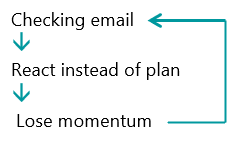
Many business owners live in a constant loop of:

The fix isn’t inbox zero…It’s inbox control.

Try this instead:

  • Check email 2–3 scheduled times per day, not constantly. Create folders or labels for: Action, Waiting, Reference.
  • Use canned responses for common questions.
  • Even better? Delegate inbox management entirely.
  • When someone else filters, flags, and responds appropriately, your inbox stops being a distraction and starts being a tool.

Time saved: 30–90 minutes per day

Mental energy saved: priceless

Resolution #2: Clean Up Your Calendar (And Defend It)

If your calendar is full but nothing significant is getting done, you don’t have a time problem — you have a boundaries problem.

Most small business owners’ calendars are cluttered with:

❌ Meetings that should have been emails

❌ Calls without agendas

❌ No-buffer scheduling = guaranteed stress

Your calendar should reflect priorities, not pressure.

A better approach:

  • Block “focus time” like it’s a client appointment
  • Add buffer zones between meetings
  • Batch similar tasks into dedicated time blocks
  • Schedule admin work intentionally

When your calendar works for you, your days feel calmer — even when they’re busy.

And this is one of those areas where a virtual assistant can quietly change everything: scheduling, rescheduling, confirmations, follow-ups… handled.

Resolution #3: Batch Tasks Instead of Context-Switching All Day

Multitasking feels productive.

It isn’t.

Every time you switch tasks — from email to social media to invoices to client work — your brain has to reset. That reset costs time and focus, even if you don’t notice it.

Task batching is one of the simplest productivity shifts with the biggest payoff.

Examples of Task Batching:

  • Write all social content for the week in one sitting.
  • Handle invoices and admin on one designated day.
  • Group client communication into set windows.
  • Create templates once instead of rewriting from scratch.

Batching reduces decision fatigue and helps you move faster without rushing.

If consistency is your 2026 goal, batching is your secret weapon.

Resolution #4: Automate What Doesn’t Need a Human Brain

Not every task deserves your attention.

If you’re manually doing things that software can handle, you’re donating time you don’t have.

Look for automation opportunities like:

  • Appointment scheduling tools
  • Email autoresponders
  • Invoice reminders
  • Intake forms and onboarding workflows
  • Content scheduling platforms

Automation doesn’t replace human support — it supports it.

The most innovative businesses combine automation with real assistance so nothing slips through the cracks.

Resolution #5: Delegate Before You Burn Out

This is the big one — and the one most business owners resist the longest.

Delegation isn’t about “giving up control.”

It’s about protecting your energy for the work only you can do.

If you’re spending hours each week on:

  • Email management
  • Scheduling
  • Data entry
  • Content formatting
  • Follow-ups
  • Research
  • Admin cleanup

You are operating as the bottleneck in your own business.

A virtual assistant doesn’t just save time — they create breathing room. And breathing room is where growth happens.

You don’t have to outsource everything, but you have to start somewhere.

I hear you asking me why I think these resolutions will actually stick.

My number one reason is that these aren’t dramatic overhauls. They’re small, sustainable shifts that compound over time.

By the end of the year, the difference between “doing everything yourself” and “working with systems and support” is massive — not just in productivity, but in stress levels, clarity, and confidence.

And that’s the real goal.

Not doing more — but doing better.

Let’s Make This the Year Work Feels Easier

If you’re ready to stop spending your days stuck in admin and start focusing on the parts of your business that actually matter, let’s talk.

I help small business owners build smart systems, delegate with confidence, and reclaim their time — without overwhelm or guesswork.

Time-Saving Resolutions Every Small Business Owner Should Keep in 2026 Read More »

productivity systems for business owners

Planning Your 2026 Business Goals to Add Clarity, Space, and Strategy

productivity systems for business owners

Planning Your 2026 Business Goals to Add Clarity, Space, and Strategy

virtual assistant

There’s something special about the “In-Between”. These are the days between Christmas and the New Year.

The decorations are still up...

The calendar feels oddly empty...

And for the first time in weeks, maybe months, you can hear yourself think.

I think of the In-Between as the post-holiday pause.

It’s that quiet window where the pressure of the year has lifted, but the rush of January hasn’t arrived yet. And it’s the perfect time to plan—not in a frantic, resolution-heavy way, but in a thoughtful, grounded one.

Because here’s the truth:

Most business resolutions fail not because they’re unrealistic, but because they’re unsupported.

Big goals without systems? Overwhelm.

Ambition without structure? Burnout.

Plans without space? Frustration.

So instead of making a long list of things you should do in 2026, let’s take a different approach. One that focuses on clarity, shelf space, sanity, and strategy — without setting yourself up for another year of doing everything the hard way.

Start With “What Needs More Space?” (Not More Goals)

Before you think about what you want to add in 2026, ask yourself a simple—and more powerful—question:

Where do I feel cramped right now?

  • Cramped schedules.
  • Cramped inboxes.
  • Cramped workflows.
  • Cramped mental load.

If your business feels tight, heavy, or constantly rushed, adding more goals won’t fix that. Creating space will.

Grab a notebook or open a blank doc and write down everything that feels crowded in your business, what feels heavy, which tasks drain you the most.

These answers tell you more about what 2026 needs than any trendy goal-setting worksheet ever will.

Your Space might look like:

  • Fewer commitments
  • Cleaner systems
  • Better boundaries
  • Delegation
  • A central place for tasks and information

Clarity comes when you stop stacking things on already-full shelves.

Choose 3 Strategic Priorities (Not 15 Resolutions)

January energy is dangerous. It convinces us we can do everything.

  • New offers.
  • New routines.
  • New systems.
  • New habits.
  • New everything.

And by February? Exhaustion.

Instead, anchor your 2026 planning around three strategic priorities. Not tasks. Not vague ideas.

Actual focus areas, such as:

  1. Streamline operations
  2. Increase consistency in marketing
  3. Improve work-life balance
  4. Build scalable systems
  5. Reduce day-to-day admin workload

And don’t worry if something doesn’t support one of those three priorities, it’s not a forever “No”; it’s a “not right now.”

Create a “Home Base” for Your Business

I saw the eyebrows go up, and heard the whispers, Tammy, I think you’re losing it. I work from home! But let me tell you, one of the biggest sources of overwhelm I see (and help clean up) is information scattered everywhere.

❌ Tasks in emails. How do you manage this?

❌ Notes in notebooks. Quick, how many notebooks do you currently have?

❌ Ideas in your phone. How many screenshots of that program you absolutely must have!

❌Deadlines in your head. Seriously? And where's the accountability for this?

That’s not a motivation problem—that’s a systems problem.

Every business needs a home base.

A home base is a single place where:

  • Tasks live
  • Priorities are visible
  • Projects are tracked
  • Notes are stored

It doesn’t have to be fancy; It just has to be consistent. It can be as simple as a paper planner. The key is choosing one and committing to it.

When your brain trusts the system, it stops carrying everything—and that’s where sanity returns.

Build Systems Before You Set Deadlines

Deadlines are motivating… until they’re not. Yes, we’ve all been there. I thrive on the adrenaline rush of beating a deadline, until I don’t.

Have you ever set a goal like:

“I’ll post on social media three times a week.”

“I’ll stay on top of admin this year.”

“I’ll finally organize my business.”

…but didn’t build a system to support it? You already know how that story ends.

Systems turn goals into routines. Rather than saying "I'll try", "I'll Start", "I'll finally", create manageable systems:

  • A weekly admin block on your calendar
  • A content batching process
  • A recurring task list
  • Standard operating procedures (SOPs)
  • Templates for emails, onboarding, and invoicing.

This is where your shelf space comes in. Instead of piling more onto your plate, you’re creating shelves where things belong.

And yes—this is also where a virtual assistant can make a huge difference. Systems are easier to build (and maintain) when you’re not doing it alone. And speaking of doing it alone...

Decide What You’re No Longer Doing Alone

Read that again and again….this might be the most important step.

As your business grows, doing everything yourself stops being a badge of honor—and starts being a bottleneck.

  1. What tasks could someone else handle just as well (or better)?
  2. What keeps pulling you out of your zone?
  3. What do you avoid because it takes too much time?

You may be struggling to stay on top of:

  • Inbox management
  • Scheduling
  • Data entry
  • Client follow-ups
  • File organization
  • Content scheduling
  • CRM updates

Delegation isn’t about giving things up; It’s about giving yourself time back.

And time is the resource that makes every other goal possible.

What do you think 2026 planning is really about?

💥 Perfection?

💥 Hustle?

💥 Doing more?

Absolutely not! (cue the game show buzzer!)

2026 planning is about:

  • Building a business that supports you
  • Creating space to think clearly
  • Using systems instead of willpower
  • Letting go of what no longer fits

So, that quiet week at the end of the year, the In-Between?

It’s a gift. Use it wisely.

Want Help Planning for 2026?

If you’re ready to plan 2026 with intention—but don’t want to build systems, organize tasks, or tackle it all alone—I’d love to help.

As a Virtual Assistant, I support business owners by:

• Creating task systems
• Organizing workflows
• Reducing admin overwhelm
• Setting up a strong foundation for the year ahead

Let’s turn your 2026 goals into something sustainable—and actually achievable.

Planning Your 2026 Business Goals to Add Clarity, Space, and Strategy Read More »

Procrastinating, overcome procrastination

The Truth About Procrastination: Simple Ways to Break the Cycle

Procrastinating, overcome procrastination

The Truth About Procrastination

Part IV of our Time Management Series

Originally published in 2021. Updated November 2025 for clarity, simplicity, and real-world application.

virtual assistant

Time Isn’t the Problem—Procrastination Is

If you’ve ever caught yourself cleaning, scrolling, or reorganizing your desk instead of doing the one thing you actually need to finish… welcome to the club. Procrastination isn’t laziness — it’s resistance. And for most of us, it shows up in predictable patterns.

This final part of the Time Management Series breaks down the six types of procrastinators (and yes, you can be more than one!) and simple ways to break the cycle so you can take back control of your time.

The 6 Types of Procrastinators — and How to Stop Them

1. The Perfectionist

You wait for the “perfect” moment, draft, or scenario. You rewrite, revise, and tweak endlessly because it never feels “good enough.” 
How to stop: Aim for completion, not perfection. Set firm deadlines and stick to them.

2. The Idealist

You love planning but struggle to start. You wait for inspiration, the right mood, the perfect moment, or a magical burst of motivation.
How to stop: Break tasks into small steps and begin before you “feel ready.”

3. The Worrywart

You focus on worst-case scenarios and get stuck in “what ifs.”New tasks feel scary, unfamiliar, or overwhelming.
How to stop: Plan for obstacles, but don’t live in them. Create a simple action plan and take the first step.

4. The Adrenaline Chaser

You insist you “work best under pressure” and thrive on the adrenaline of a deadline. You rely on that Hail Mary last-minute energy rush to get you through.
How to stop: Give yourself shorter, self-imposed mini-deadlines and reward early progress.

5. The Rebel

You resist rules, deadlines, and expectations — even your own. 
How to stop: Reframe tasks as choices you're making for your own benefit, rather than commands. Change your "To-Do" list to a "Task" list. 

6. The People Pleaser

You say “yes” too often, spread yourself too thin, and end up overwhelmed...even frozen. 
How to stop: Protect your bandwidth. Practice saying “let me check my schedule.” 

How to Tell When You’re Procrastinating

Procrastination often hides in everyday actions:

  • You instantly choose easier tasks over the important ones.

  • You stay “busy” but don’t move closer to your goals.

  • You wait for the “right” moment that never comes.

  • You avoid thinking about the task altogether.

  • You endlessly research, plan, or learn — but never implement.

Awareness is the first step to change.

Simple Ways to Stop Procrastination

⭐ Set SMART Goals

Clear goals tell your brain what matters — eliminating confusion and making it easier to get started.

Plan Your Task List

Break big goals into manageable pieces. Identify urgent tasks and those you can delegate or schedule later. Use daily, weekly, and monthly planning to stay on track.

Break Tasks Down Smaller

Small steps build momentum. Focus on completing one piece at a time - one drawer, one email batch, one client task — not the whole mountain.

Replace Bad Habits with Good Ones

Use triggers that support your goals - small shifts in your habits add up:

  • Move your alarm across the room
  • Schedule your 10K steps first
  • Replace negative thoughts with three positive ones
Visualize “Done”

Picture the end result — how it feels, what you gain, what stress disappears.

Ask Yourself: “What’s the worst that can happen?”

Chances are, the fear isn’t as big as your brain is telling you.

Reward Yourself

Celebrate wins (big and small). Your brain loves incentives — use them.

Procrastination isn’t a character flaw—it’s a habit. And habits can change.
Once you understand your procrastination style and learn how to interrupt the pattern, your time becomes easier to manage — and your days feel a whole lot lighter.

This wraps up our four-part Time Management Series, and I hope it’s helped you build more intention, clarity, and calm into your daily routine.


Don't forget to grab your workbook packed with goal-setting templates, habit trackers, and planning tools to help you stay focused and in control of your time.

Part I – What Is Your Time Vampire

Part II – 12 Steps to Vanquish Your Time Vampires

Part III – Improve Focus and Productivity for Better Time Management

Part IV – The Truth About Procrastination


The Truth About Procrastination: Simple Ways to Break the Cycle Read More »

Time Management, productivity habits

9 Simple Ways to Boost Productivity and Manage Time Better

Time Management, productivity habits

9 Simple Ways to Boost Productivity and Manage Time Better

Part III of the Time Management Series

Originally published in 2021. Updated November 2025 with new strategies and resources to help you sharpen your focus and get more done with less stress.

virtual assistant

Time Isn’t the Problem—Focus Is
Improving your focus and productivity isn’t about cramming more into your schedule—it’s about doing what matters most. With clear goals, thoughtful planning, and a little self-awareness, you can shift from constant busyness to calm control.

In Part III of our Time Management Series, we’ll explore how to set meaningful goals, design task lists that work for you (not against you), and discover your natural productivity rhythm so you can work smarter, not harder.

1. Create and Set Smart Goals

If you want to manage your time better, start by setting the right goals. SMART goals are Specific, Measurable, Achievable, Realistic, and Timely.

When your goals meet these five criteria, it’s easier to plan your steps and stay motivated—because you’ll know exactly what success looks like.

Example SMART Goal:

By February 1, 2026, I will reduce administrative time by 25% so I can focus more on revenue-generating client work. I’ll accomplish this by automating my invoicing system, delegating email management to a virtual assistant, and setting fixed blocks of time for client communication. Progress will be reviewed weekly by tracking hours spent on admin tasks versus client projects.

Breakdown:

  • Specific: Reduce administrative time by streamlining and delegating routine tasks.
  • Measurable: 25% reduction tracked through time logs or task management tools.
  • Achievable: Focused on realistic process improvements and small operational changes.
  • Relevant: Directly supports business growth and client satisfaction.
  • Timely: Target date of February 1, 2026, provides urgency and accountability.

Once you’ve written your SMART goals, it’s time to break them down into actionable steps that fit your business rhythm.

Specific goals lead to productive days.

2. Create Effective Task Lists

Your goals give direction—your task list gives momentum.

If your goal is to reduce administrative time by 25%, your task list should focus on the actions that make that happen — like automating, batching, and delegating.

Here’s how to make your task list work for you, not against you:

  • Use the right tools. Whether it’s a project management app like Asana or ClickUp, or a simple planner, choose what helps you visualize your workload.
  • Write clear, actionable tasks. Replace vague entries like “organize email” with “set up client inbox rules and delegate follow-ups to VA by Friday.”
  • Group by impact. Focus first on revenue-generating or time-saving actions—those that bring you closer to your goal.
  • Keep daily lists short. Each day, choose three priority tasks that move the needle. Overloading your list leads to burnout, not productivity.
  • Set realistic time limits. Block time for focused work, and include small breaks between tasks to reset your energy.

Your task list isn’t a dumping ground—it’s a daily game plan. Each task should connect to a bigger outcome, helping you focus on what actually builds your business and frees your time.

3. Understand What You Need to Focus On

Being busy doesn’t always mean being productive.

Focus on the actions that directly support your goals. Ask yourself:

  1. What results am I expecting from this task?
  2. Does it move me closer to my bigger objective?
  3. Could someone else handle it better or faster?

If you’re unsure, track your results. Like any good experiment, the data will show where your time and energy are best spent.

4. Prepare Your Brain for Each Task

Ever jump from one task to the next without really thinking about it? That’s a focus killer.

Take a minute before each task to reset your mind. Review your “why” and visualize the outcome. This mental preparation sharpens focus and prevents mindless multitasking.

5. PAUSE!

Your brain needs breathing room. Give yourself short breaks between tasks to reset your energy.

Try the Pomodoro Technique: work for 25 minutes, break for 5. After four cycles, take a longer 20-minute break. This simple rhythm helps prevent burnout and keeps your focus fresh all day.

6. Review Your Actions

Reflection is where growth happens.

At the end of each day or week, review:

  1. What worked well?
  2. What didn’t?
  3. Where did my time disappear?

Use your SMART goals as benchmarks. Tracking your results (via planner, app, or your own notes) turns vague feelings of “busy” into measurable progress.

7. Know Your Zone

We all have natural energy cycles. Some people hit their stride early in the morning; others thrive late at night.

Find your peak productivity windows by paying attention to when you feel most alert, creative, or motivated. Once you know your rhythm, schedule your hardest tasks during those hours.

You’ll get more done in less time—and it’ll feel easier.

8. Test and Adjust

The truth is, no system is perfect on the first try.

Test new habits, track results for at least three weeks, and adjust as needed. For example:

  • Could a shorter workout give you the same results?
  • Could you replace a time-wasting task with one that delivers better outcomes?

Efficiency isn’t about cutting corners—it’s about finding what truly works.

9. Know What Makes You Tick

Self-awareness is your most powerful productivity tool.

Ask yourself:

  1. What are my strengths and weaknesses?
  2. What energizes me—and what drains me?
  3. Am I a morning person or a night owl?
  4. What’s my “why”? (As Simon Sinek says, Start With Why.)

When you understand how you operate best, you can structure your day around your natural flow rather than fighting it.

Improving your focus and productivity isn’t about being perfect—it’s about being intentional. When you align your goals, tools, and natural rhythms, time management becomes effortless.

You’ll stop feeling pulled in every direction and start ending each day with the satisfaction of progress and peace of mind.

Ready to turn these strategies into lasting habits?

Download my Time Management Workbook today. It’s packed with guided exercises and planning templates to help you master your focus, build momentum, and make every minute count. And it's FREE.

Part I – What Is Your Time Vampire

Part II – 12 Steps to Vanquish Your Time Vampires

Part III – 9 Simple Ways to Boost Productivity and Manage Time Better

Watch your inbox for Parts IV coming next week.


9 Simple Ways to Boost Productivity and Manage Time Better Read More »

Time management

12 Steps to Vanquish Your Time Vampires

Time management

12 Steps to Vanquish Your Time Vampires

Part II of the Time Management Series

Initially published in 2021. Updated November 2025 with new insights, tools, and a free workbook to help you reclaim your time.

virtual assistant

If you completed Part I, you’ve already identified the sneaky “time vampires” lurking in your day. Now it’s time to take back control.

When you let go of unnecessary time-wasters and focus on what truly matters, you’ll be amazed at how much lighter, more productive, and more in control your life feels. These 12 steps will help you protect your time, boost your focus, and move closer to your goals—without over-scheduling or burnout.

1. Check Your Attitude

Before you tackle your schedule, start with your mindset. If you don’t believe you have control over your time, you won’t take control of it.

Time management begins with recognizing that you decide how you spend your hours. Adopting an abundance mindset—and learning to delegate, automate, or delete tasks that don’t serve you—creates more space for what truly matters.

2. Go to Bed and Get Up at the Same Time Each Day

This may sound simple, but consistent sleep is a superpower. When you wake and sleep on a regular schedule, your body learns to perform at its best.

Seven to nine hours of good sleep isn’t indulgent—it’s fuel. A clear, well-rested mind gets more done in less time.

3. Breathe Before You Begin

Before diving into work, take five minutes to breathe intentionally:
Inhale through your nose for 4 counts → hold 4 → exhale slowly through your mouth for 4.

This quick reset calms your nervous system and prepares your mind for focused work. A deep breath between tasks can be the difference between frantic productivity and intentional action.

4. Organize Tasks by Priority (The Time Matrix)

Not everything deserves the same level of attention. Use the Time Management Matrix—made famous by Stephen R. Covey, who wrote the book "The 7 Habits of Highly Effective People"—to sort your to-dos:

Quadrant Description Examples
1. Important & Urgent Requires immediate action Client deadlines, crises
2. Important & Not Urgent Builds long-term success Planning, relationships, wellness
3. Not Important & Urgent Distracting “now” tasks Emails, calls, interruptions
4. Not Important & Not Urgent True time vampires Scrolling, gossip, busy work

Focus on Quadrant 2—the sweet spot of proactive, purposeful work.

5. Schedule Everything Realistically

Once your priorities are set, plan your day with intention.
Batch errands together, create realistic deadlines, and always leave buffer time.

For example: combine errands to save drive time, or set “email hours” instead of constantly checking. Replace low-value tasks with high-value ones that move you closer to your goals.

6. Delegate More

Delegation isn’t giving up control—it’s claiming back time.

Outsource tasks that drain your energy. Hire a Virtual Assistant (like TaskVA!) to handle routine work, so you can focus on growth. Even small investments—like grocery delivery or scheduling help—can free hours of mental space.

7. Plan Your Day the Night Before

Take 10 minutes each evening to prepare for tomorrow.
Review your accomplishments, carry over unfinished items, and list tomorrow’s top three priorities.

When you wake up, you’ll already know what matters most—and that clarity saves valuable morning energy.

8. Cross Things Off Your List

Checking off a task releases dopamine—a natural motivation boost.

Use a whiteboard, notebook, or sticky notes (my personal favorite!). When you physically cross off or toss a completed note, you’re reinforcing your progress and training your brain to stay consistent.

9. Use Gap Time Wisely

Waiting in line? Sitting in the pickup lane? Use those minutes intentionally.

Keep a short list of “gap-time” tasks—reply to messages, listen to a podcast, review goals, or even take a mindfulness break. When you expect interruptions, they stop being time thieves.

10. Let Go of Guilt

Boundaries aren’t selfish—they’re strategic.

You don’t owe everyone your time. Politely decline calls, texts, or requests that derail your priorities. Guilt drains focus; grace fuels it. Choose peace of mind over people-pleasing.

11. Arrive Early

Plan to arrive 10–15 minutes early for appointments. It prevents stress and gives you time to collect your thoughts.

Use that margin to review notes, breathe, or even meditate—arriving calm instead of rushed keeps your day running smoothly.

12. Be Done When You're Done

Perfectionism is just procrastination in disguise.

Sometimes “good enough” really is enough. Accept completion, let go of the need to tweak endlessly, and move forward. Each finished task frees energy for the next big goal.

Time management isn’t about squeezing more into your day—it’s about making space for what matters most.

When you identify your time vampires and apply these 12 steps, you’ll feel calmer, clearer, and back in charge of your schedule.

Take your productivity to the next level!

Use the workbook and the guides in the Time Management series to build habits that stick, plan with purpose, and finally take back your time.

Part I – What Is Your Time Vampire

Part II – 12 Steps to Vanquish Your Time Vampires

Watch your inbox for Parts III & IV

12 Steps to Vanquish Your Time Vampires Read More »

time management

What Is Your Time Vampire?

What Is Your Time Vampire?

Part I of our Time Management Series

I first wrote this piece a while back when I was battling my own “time vampires.” I’ve given it a 2025 refresh — with updated tips and a downloadable workbook to help you reclaim your day. - TS

Have you ever planned a productive day, only to look up at 3:00 p.m. and wonder—where did all my time go? You know the feeling. You sit down to work, open your laptop, and promise yourself, “Just five minutes on social media.” Before you know it, an hour’s gone, your coffee’s cold, and that project deadline is suddenly staring you down.

Those, my friend, are time vampires—the sneaky little thieves that drain your energy and productivity without you even realizing it.

Time vampires are those sneaky habits, distractions, and activities that quietly drain your energy and productivity. They disguise themselves as harmless “quick tasks” or “necessary breaks,” but left unchecked, they can completely suck the life out of your day.

And just like in the movies, once you invite them in, they’re hard to get rid of.

Why You Need to Identify Time Vampires

Time is the one thing we can’t replenish. You can make more money, get more clients, even buy more tools—but you can’t buy more hours in a day. When you let time vampires run wild, they eat away at your most valuable resource: your focus.

A time vampire is anything that consumes your time without adding real value.

Before you can fix your time management struggles, you have to identify which vampires haunt your day.

Common Time Vampires Lurking in Your Day

Let’s shine a flashlight on some of the most common culprits:

🩸 Social Media Scrolling – That quick check turns into hours of reels and cat videos.
🩸 Email Overload – Constantly checking your inbox makes you counterproductive.
🩸 Meetings Without Purpose – If there’s no clear agenda, it’s probably a waste.
🩸 Multitasking – Doing five things at once makes you less effective.
🩸 Unplanned Interruptions – Calls, texts, pets, and even family can all derail focus.
🩸 Lack of Planning –  You'll wander through your day without clear direction.

These may look different for everyone—but they all have one thing in common: they steal time in small doses until you’re left wondering where the day went.

Be Honest About How You're Spending Your Time

Grab a notebook (or your favorite digital planner) and track your time for a week. Write down everything you do, every switch of attention, every “just a minute” detour.

At the end of each day, look at that list with brutal honesty. Which activities push you closer to your goals—and which ones quietly drain your time and energy? Those are your time vampires.

The Biggest Time Vampires in Business

Through years of working with small business owners, accountants, and realtors, I’ve noticed a few vampires show up again and again:

1.    Not Setting Goals - Without a target, your day gets hijacked by distractions.

2.    Lack of Planning - Working without a plan leads to wasted time and duplicated effort.

3.    Procrastination - Putting off demanding tasks invites stress—and keeps you stuck.

4.    Distractions - Unscheduled calls, “quick questions,” and constant pings can wreck your flow.

5.    Failure to Delegate - Trying to do it all yourself is the ultimate productivity killer.

Set Boundaries & Build Defenses

The good news? Time vampires don’t stand a chance once you shine a light on them. Here are a few quick-start tactics:

  1. Schedule your priorities first. Block out time for what truly matters.
  2. Use timers or focus apps. Try the Pomodoro method (25 minutes of focus, 5 minutes of break).
  3. Batch similar tasks. Handle emails, calls, or errands in clusters.
  4. Just Say No. Protect your focus—especially from non-urgent requests.
  5. Unplug strategically. Turn off notifications during deep work sessions.

Remember, eliminating time vampires isn’t about doing more—it’s about doing better.

YOUR CHALLENGE

Today, identify one time vampire and commit to slaying it. Maybe it’s scrolling, maybe it’s overbooking, maybe it’s perfectionism. Whatever it is—stake it through the heart!

Over the next few weeks, I’ll share practical strategies to manage your time, boost your focus, and protect your energy, because when you take back your time, you take back your business—and your life.

So, what’s your biggest time vampire? Drop it in the comments—I’d love for you to share one thing you’ll slay this week—and check out the November newsletter Spotlight section on Nov 5th!

In the next part of my Time Management Series, we’ll explore practical tools and habits to reclaim your time and rebuild your focus. (Spoiler: garlic not required 🧄).

Ready to stop feeling overworked and start working smarter?

Use our Time Management Workbook along with the guides in this series. Together, they are designed to help small business owners and professionals take back control of their day.


What Is Your Time Vampire? Read More »

human support vs ai

What’s the Difference Between a Virtual Assistant and an AI Assistant?

What’s the Difference Between a Virtual Assistant and an AI Assistant?

The other day I told someone I’ve been helping Virtual Assistants grow their businesses since 2003. Their response?

“Oh, like Siri?”

I had to laugh out loud at that one — but it also made me realize something important.

Apparently, to the younger crowd, “Virtual Assistant (VA)” means an AI bot that sets your reminders, tells you the weather, and maybe plays your sad-girl playlist when you break up with Chad. (Thanks, Alexa.)

But here’s the thing: when I say Virtual Assistant, I mean a real human professional — not a robot in your pocket. And trust me, if you’ve ever hired a Virtual Assistant for your business, you know they’re about as far from Siri as you can get.

This generational language gap is hilarious — and a little concerning. Let’s break it down:

  • Boomers: “Oh, like an executive secretary but online?”
  • Millennials: “My Virtual Assistant helps me manage my inbox, my social media, and my sanity.”
  • Gen Z: “Cool, can your Virtual Assistant order me a burrito like Alexa?”

Somewhere between the early 2000s and today, the definition of Virtual Assistant shifted. And while AI assistants have their place, let’s set the record straight on what a Virtual Assistant really is.

A Short History of the Virtual Assistant Industry

The phrase Virtual Assistant didn’t appear out of thin air. It has roots going back over two decades:

  • 1990s: As internet access improved, entrepreneurs started experimenting with hiring remote administrative support.
  • Early 2000s: The term “Virtual Assistant” was coined to describe skilled professionals offering business services online. (This is when I launched the Virtual Assistant Networking Association in 2003 — we were trailblazers before Zoom was even a thing.)
  • 2011–2014: Siri and Alexa burst onto the scene, and suddenly “Virtual Assistant” meant a chatty robot who sometimes misunderstands you.
  • 2020s: AI exploded into mainstream use (hello, ChatGPT), and now the confusion is everywhere. Businesses Google ‘hire a Virtual Assistant’ and half the results are software bots instead of real people offering Virtual Assistant services.

But here’s the truth: the Virtual Assistant profession was built by humans, for humans. It’s a legitimate, global industry where freelancers provide valuable business support.

What Is a Virtual Assistant, Really?

Let’s get crystal clear.

Virtual Assistant is:

✔️ A real human freelancer who runs their own business.
✔️ Someone who provides Virtual Assistant services like admin support, marketing, customer care, bookkeeping, tech troubleshooting, or project management.
✔️ A professional you can hire to lighten your workload, grow your business, and keep you sane.

Virtual Assistant is NOT:

❌ Siri
❌ Alexa
❌ Google Assistant
❌ ChatGPT (sorry friend, but you’re not invoicing clients anytime soon)

Virtual Assistant Services: What They Can Actually Do

When you hire a Virtual Assistant, you’re hiring a professional who can handle tasks like:

  • Managing your inbox and calendar.
  • Creating content for your blog, newsletters, or social media.
  • Handling customer service requests with actual empathy.
  • Organizing projects and coordinating deadlines.
  • Running marketing campaigns.
  • Bookkeeping, invoicing, and tracking expenses.

In short, a Virtual Assistant keeps your business running smoothly while you focus on growth.

Compare that to asking Siri to book your flight: “Here’s what I found on the web.” Yeah, not the same.

Real Stories of Virtual Assistants in Action

Want proof? Let’s look at what human Virtual Assistants do in the real world:

  • A business owner drowning in 2,000 unread emails hired a Virtual Assistant who set up systems, filtered the junk, and created templates. By the end of the week, the inbox was manageable, and client satisfaction was up.
  • A coach wanted to launch an online course but was overwhelmed with tech. Their Virtual Assistant set up the entire system — from landing pages to payment processors — and the launch doubled expected sales.
  • A small e-commerce shop outsourced customer service to a Virtual Assistant who handled complaints with care. Result? Repeat buyers, glowing reviews, and a lot less stress for the owner.
  • From coaches and consultants to e-commerce shops and busy entrepreneurs, businesses of all sizes hire Virtual Assistants to save time and grow smarter.

Notice the pattern? These are things no bot is going to do well — because they require judgment, personalization, and good old-fashioned human care.

5 Things a Virtual Assistant Can Do That AI Never Will

Let’s get cheeky. Here are five things you can expect from a human Virtual Assistant that no AI bot can deliver:

  1. Read the Room. A Virtual Assistant knows when NOT to send that pitch email because the client is at their mom’s funeral. A bot? Not so much.
  2. Creativity. AI can spit out words, but only a human Virtual Assistant can make them sound like you.
  3. Encourage You. Bots don’t cheer you on. Your Virtual Assistant will send you a GIF and a “you’ve got this!” on launch day.
  4. Handle the Chaos. Three time zones, ten personalities, one looming deadline. AI short-circuits. A Virtual Assistant thrives.
  5. Care. Real, human, heartfelt care. That’s something no code can replicate.

Funny Scenarios: Ask Siri vs Ask a Virtual Assistant

Let’s play a game:

  • Ask Siri to reconcile your books.
    Siri: “Sorry, I don’t understand the word QuickBooks.”
  • Ask Alexa to manage your client relationships.
    Alexa: “Playing ‘Toxic’ by Britney Spears.” 🎶
  • Ask a Virtual Assistant the same questions.
    Virtual Assistant: “Done, organized, and the client just emailed to say thank you.”

See the difference?

Why the Confusion Matters

Here’s where this generational mix-up gets serious.

  • For businesses: If you search “hire a Virtual Assistant” and land on AI bots instead of real professionals, you’re missing out on the support that can actually scale your business.
  • For freelancers: If you’re building a career as a Virtual Assistant, you don’t want to be lumped in with free tech tools. Your expertise deserves recognition and fair pay.

This is why defining and protecting the Virtual Assistant profession is so important.

The Future of Virtual Assistants in the Age of AI

Now here’s the twist: Virtual Assistants aren’t ignoring AI. They’re using it.

In fact, we even teach it inside our AIVAmastery.com course — showing Virtual Assistants how to integrate AI into their businesses so they can save time, serve clients better, and stay ahead of the curve in the Virtual Assistant industry. 💜

The most successful Virtual Assistants today leverage AI to make their services more efficient, creative, and scalable:

  • AI drafts → the VA polishes.
  • AI analyzes → the VA interprets.
  • AI reminds → the VA implements.

Instead of replacing Virtual Assistants, AI is becoming a powerful tool in their toolkit

Businesses win because they get the best of both worlds: cutting-edge tech combined with the human touch.

Virtual Assistants Aren’t Robots — They’re Better

So, let’s clear it up once and for all:

A Virtual Assistant (VA) is not Siri. Not Alexa. Not ChatGPT. A Virtual Assistant is a real human freelancer who runs their own business and supports clients with administrative, technical, and creative services — think calendars and emails, websites and tech, blogs and graphics.

Virtual Assistants aren’t going anywhere. In fact, they’re the ones helping businesses use AI smarter while still providing the empathy, creativity, and strategy no robot can replicate.

So next time someone says, “Oh, you’re like Siri?” smile and say:

“Nope. Better. I’m a Virtual Assistant — a real human helping real businesses thrive.”

💜 And if you want to join the longest-running Virtual Assistant community online (since 2003, thank you very much), come hang out with us at VAnetworking.com.

💜 And if you’re ready to level up your skills with AI, check out our AIVAmastery.com training program built specifically for Virtual Assistants.

What’s the Difference Between a Virtual Assistant and an AI Assistant? Read More »

strategic planning

Q3 Planning Made Simple

strategic planning

Q3 Planning Made Simple

virtual assistant

Not to alarm you, but the calendar just whispered, “Hey, we’re halfway through the year.” 😳 And if you're like most business owners I know, you’re somewhere between “Wait, what?!” and “Cool, so… how behind am I?”

Whether you crushed Q1 and coasted into Q2 or you’ve been riding the chaos wave since January, Q3 is your golden opportunity to pause, recalibrate, and set a realistic, motivating path for the rest of the year. This isn’t about hustle harder. It’s about planning smarter—and in case you're wondering, this is where your friendly neighborhood virtual assistant comes in.

Why Q3 Matters (And Why You Shouldn’t Skip It)

Here’s the deal: Q3 (July–September) often flies under the radar because it falls smack in the middle of vacations, back-to-school madness, and the calm-before-Q4 chaos.

But that’s exactly why it’s so powerful.

Q3 gives you a chance to:

  • Check your progress on yearly goals without panic
  • Refocus your time and energy while clients are quieter
  • Lay the foundation for a strong Q4 (which, let’s face it, is a sprint)

This is the time to shift gears, adjust your sails, and clean up the clutter—both literal and strategic.

Your Mid-Year Audit Checklist

Before you jump into goal-setting, let’s take stock of where you are. A mid-year audit helps you assess, re-prioritize, and eliminate what’s no longer working.

Ask yourself:

  • Which goals did I set in January that still matter?
  • What have I accomplished—and what did I completely ignore?
  • What recurring tasks suck up my time but don’t move the needle?
  • Where am I consistently dropping the ball?

💡 TASK Tip: Let your virtual assistant pull data from your project boards, client tracker, or time logs. Not only does this save you hours, but it also provides you with clean, accurate insights to work with.

Set Realistic, Quarterly-Sized Goals

Forget year-long vision boards for a moment. Q3 is your sweet spot for setting clear, focused goals that you can knock out in 90 days.

Use the SMART method:

  • Specific: Don’t say “grow the business”—say “get 5 new retainer clients.”
  • Measurable: Attach numbers, timelines, or frequency.
  • Achievable: Be honest—can you do this without skipping sleep?
  • Relevant: Does it support your bigger picture?
  • Time-bound: Deadlines keep you moving (and Virtual Assistants help you meet them).

🛠️ Need help clarifying your goals? Let’s chat about how TASK VA can support your next steps.

Break Big Goals Into Bite-Sized Projects

Once your goals are set, break them down into actionable tasks. This is where overwhelm magically becomes progress.

Here’s how:

  1. Write out the full list of micro-steps.
  2. Assign estimated time + due dates.
  3. Identify which tasks you can delegate.

🌟 Pro move: Open a shared ClickUp or Trello board with your virtual assistant and build the plan together. You assign the vision—they handle the pieces.

Delegate Strategically for Q3 Success

You're not meant to do this alone. In fact, you shouldn't.

Here are smart things to outsource during Q3:

  • Recurring admin (emails, invoicing, scheduling)
  • Updating or maintaining your CRM
  • Drafting social media and blog content
  • Client onboarding/offboarding workflows
  • Event planning (yep, fall webinars are closer than you think)

🎯 Try This: Book a “Q3 Kickoff Call” with your Virtual Assistant. Bring your goals, and together, map out a support plan to help you hit them—with less burnout.

Don’t have a Virtual Assistant? You can find me at TheTaskVA.com. Explore TASK VA packages.

Use the Right Tools to Stay on Track

Tech doesn’t have to be fancy. It just needs to work.

Try these for Q3 tracking:

  • ClickUp or Asana: Project planning and team collaboration
  • Google Sheets: Visual quarterly budget + KPI tracking
  • Loom: Quick video updates for your virtual assistant or team
  • Calendly or TidyCal Keep meetings from eating your week
  • Pomofocus.io: Use the Pomodoro technique for focused work blocks

Build In Breathing Room

Here’s your permission slip: Every goal needs downtime built in.

Block off:

  • Real Vacation days (not “maybe time off”—actual, no-laptop time)
  • CEO Days: Days to step back and work on your business, not in it
  • Admin hours: Weekly space to delegate, prep, and review

Don't Forget  Your virtual assistant can help hold you accountable for all of this.


Mid-year isn’t a finish line—it’s your check-in point. Planning for Q3 is your opportunity to get clear, get help, and build the systems that carry you through the rest of the year with confidence and (dare I say) ease.

You don’t need to hustle harder. You need a plan—and a partner to help you stick to it.

Let’s make Q3 the quarter you delegate more, stress less, and see real progress.

Q3 Planning Made Simple Read More »

Essential Year-End Tasks

Wrapping Up 2024: Essential Year-End Tasks for Your Business

Essential Year-End Tasks
virtual assistant

The holidays are here, and while everyone else is stringing lights and sipping eggnog, you’ve got a business to run. And not just any business—your business, your baby. Wrapping up the year is more than just a metaphor; it’s your chance to tie everything up neatly so you can step into 2025, ready to crush it.

Here’s a checklist to help you close out 2024 like the boss you are:

Reflect and Review

Before you dive into next year’s goals, take a beat to look back. What went well this year? What didn’t? Pull out your financials, customer feedback, and sales reports. Maybe you’re crushing your revenue goals, but your social media engagement flatlined. These insights are gold—treat them like it.

Organize Your Financials

The last thing you want is to scramble for receipts on April 14th. (March 14th if you file a 1065!!) Reconcile your books, review outstanding invoices, and check for last-minute deductible expenses (hello, new office chair?). If you’ve had a stellar year, now’s the time to consult your accountant about deferring income or making extra retirement contributions to manage your tax liability.

Show Some Love to Your Team

If you have employees, contractors, or even that one virtual assistant who’s saved your bacon more times than you can count, now’s the time to say thank you. Bonuses, gift cards, or even a heartfelt email can go a long way. Appreciation isn’t just nice; it’s smart business.

Audit Your Systems and Processes

The year-end is perfect for playing detective. Are there bottlenecks slowing you down? Tools you’re paying for but not using? Whether it’s automating customer follow-ups or switching to a better CRM, small tweaks now can save you headaches later.

Plan for 2025

Dream big, but plan smart. Set goals that are ambitious yet attainable. Break them down into quarterly milestones. If you’re still writing your goals on sticky notes (no judgment), consider upgrading to a planning tool or system. Think about what new skills, tools, or people you’ll need to hit those targets.

Celebrate Your Wins

Pop the champagne, friend. Whether this was your best year yet or a scrappy comeback, you did it. Acknowledge your hard work and resilience. Celebrate with your team, your clients, or even your cat (they’ve been listening to your Zoom calls all year, after all).

Take Time for Yourself

Folgers may be good to the last drop, but you can’t pour from an empty cup. Carve out some time to rest, recharge, and reconnect with what matters most to you. The world will still be there when you’re ready to jump back in.

Closing out the year strong isn’t just about tying up loose ends; it’s about setting the stage for an incredible 2025. Reflect, organize, appreciate, and plan—and don’t forget to celebrate everything you’ve accomplished. You’ve earned it.

Now, go ahead and wrap up 2024 like the superstar entrepreneur you are. You’ve got this!

Wrapping Up 2024: Essential Year-End Tasks for Your Business Read More »

business efficiency and organization tips

Mastering Business Efficiency: Lessons from a DIY Relocation Journey

business efficiency and organization tips

Mastering Business Efficiency: Lessons from a DIY Relocation Journey

virtual assistant

Relocating to a new State can feel like navigating a maze. From the excitement of starting fresh to the challenge of settling into a new environment, the process is full of ups and downs. But did you know that the skills you use to organize your new home can also apply to running a business? That's right! As someone who's recently been through a major move and is in the process of renovating our new home, I've discovered that the same strategies for DIY home renovations can translate into practical tips for improving business efficiency. Let me share how the lessons learned from our recent relocation can help streamline your business operations and boost productivity.

Planning Ahead: The Blueprint for Success

When renovating a new home, the first step is always planning. You wouldn’t jump into tearing down walls without a clear vision of what you want. Similarly, effective business organization begins with a solid plan. Here's how to map out your business blueprint:

Set Clear Objectives

Just as you'd determine the goals of your home renovation (e.g., adding a new kitchen island or updating the bathroom), establish clear objectives for your business. What are your short-term and long-term goals? Are you aiming to increase revenue, streamline processes, or expand your team? By setting clear objectives, you can create a focused strategy that guides your decisions and actions.

Create a Step-by-Step Plan

Breaking down the project into manageable steps helps prevent overwhelm in home renovations. Apply the same principle to your business. Develop a detailed plan that outlines each phase of your project or initiative. For example, if you're implementing a new customer management system, outline the steps from researching options to training your team and integrating the system into your daily operations.

Budget Wisely

Budgeting is crucial whether you’re renovating a kitchen or launching a new marketing campaign. Allocate resources based on priority and need. Be realistic about what you can afford and plan for unexpected expenses. A well-managed budget helps you stay on track and avoid financial stress.

Organizing Resources: From Tools to Teams

Having the right tools and materials is essential for home renovation. The same applies to your business. Organize your resources effectively to maximize efficiency.

Optimize Your Workspace

Just as you'd arrange your tools and materials in a home renovation project for easy access, ensure your workspace is organized. A clutter-free environment promotes productivity and reduces stress. Invest in ergonomic furniture, organize documents digitally, and declutter regularly to create a more efficient workspace.

Utilize Technology

During our move, technology played a crucial role in managing logistics. Similarly, leveraging technology in your business can streamline operations. Use project management software such as ClickUp to track tasks, collaborate with your team, and set deadlines. Implementing automation tools can also help with repetitive tasks, freeing up time for more strategic work.

Build a Strong Team

Just as a renovation requires a skilled team (contractors, electricians, plumbers), your business needs a capable team to function efficiently. Hire individuals with the right skills and expertise. Invest in their development and foster a collaborative work environment. A well-coordinated team can tackle challenges more effectively and drive your business forward.

Time Management: Scheduling and Execution

Efficient time management is crucial both in home renovations and in running a business. Here’s how to keep things on schedule:

Develop a Timeline

In our recent move, creating a timeline was key to staying organized. For your business, develop a realistic timeline for projects and tasks. Use Gantt charts or project management tools to visualize deadlines and track progress. Be sure to build in some flexibility for unexpected delays or changes.

Prioritize Tasks

Just as you’d prioritize which rooms to renovate first, prioritize tasks in your business. Identify high-impact tasks that contribute most to your goals and tackle those first. Use techniques like the Eisenhower Matrix to categorize tasks by urgency and importance, ensuring that critical tasks receive the attention they deserve.

Avoid Procrastination

Procrastination can derail both home renovations and business projects. To combat this, set specific deadlines and stick to them. Break tasks into smaller, manageable chunks to avoid feeling overwhelmed. Celebrate small wins along the way to stay motivated and maintain momentum.

Problem Solving: Navigating Challenges

Challenges are inevitable whether you’re dealing with a renovation setback or a business hurdle. How you handle these challenges can make or break your success.

Adapt and Adjust

During our move, we encountered unexpected issues, like a delayed flooring delivery. Similarly, in business, being flexible and ready to adapt to changes is crucial. If something doesn’t go as planned, reassess your strategy and make necessary adjustments. Being open to change can turn potential setbacks into opportunities for growth.

Learn from Mistakes

Mistakes are part of any renovation project. The key is to learn from them and apply those lessons to future projects. The same goes for your business. Analyze what went wrong, identify the root causes, and implement changes to prevent similar issues in the future. Embracing a growth mindset will help you continuously improve and avoid repeating mistakes.

Seek Help When Needed

Sometimes, tackling a renovation project requires professional assistance. Likewise, don’t hesitate to seek help in your business. Whether it’s consulting with an expert, hiring a mentor, or bringing in additional resources, reaching out for support can provide valuable insights and solutions to complex problems.

Continuous Improvement: Fine-Tuning for Success

Once a renovation is complete, it’s important to review the results and make any necessary adjustments. The same approach applies to your business.

Evaluate Performance

After completing a project or implementing a new process, evaluate its performance. Are you achieving the results you anticipated? Are there areas that need improvement? Regularly reviewing performance metrics helps you identify successes and areas for enhancement.

Solicit Feedback

Feedback from family or friends can provide valuable perspectives on home renovations. In business, seek feedback from clients, team members, and stakeholders. Their insights can help you understand what’s working well and what needs adjustment. Use this feedback to refine your strategies and improve overall efficiency.

Embrace Innovation

Just as home design trends evolve, business practices do, too. Stay informed about new tools, technologies, and methodologies that can enhance your efficiency. Embracing innovation ensures that your business remains competitive and adaptable to changing market conditions.

When you break it down, it’s easy to see how running a business efficiently is much like managing a successful home renovation. Both require careful planning, effective organization, time management, problem-solving, and a commitment to continuous improvement. By applying the lessons learned from our recent relocation to your business, you can create a streamlined operation that fosters productivity and growth.

Embrace these strategies, and you'll find that organizing your business can be as rewarding as transforming a new home into a well-oiled machine. Here’s to a more efficient and organized business!

Ready to Transform Your Business Efficiency?

Just like a successful home renovation can breathe new life into your living space, optimizing your business operations can invigorate your productivity and growth. If you’re looking to streamline your processes, organize your tasks, or need expert help managing your workload, our virtual assistant services are here to support you every step of the way.

Contact us today to discover how our virtual assistant services can improve your business's efficiency and clarity. Let’s turn those renovation-inspired strategies into real results!


Mastering Business Efficiency: Lessons from a DIY Relocation Journey Read More »

Boost Business Growth through Outsourcing

Outsourcing for Small Biz Growth

Boost Business Growth through Outsourcing

Outsourcing for Small Biz Growth

virtual assistant

In today's competitive business environment, small business owners are constantly seeking ways to optimize operations and boost growth. One of the most effective strategies is by outsourcing non-core activities. These are tasks essential to running your business but do not foster growth. Outsourcing those tasks enables you to focus on your primary goals while skilled professionals handle secondary tasks. This approach not only maximizes efficiency but also enhances productivity and scalability.

The Benefits of Outsourcing

Enhanced Focus on Business Growth: Outsourcing tasks like administrative duties, customer support, and digital marketing allows business owners to concentrate on developing their products and services. This focus is crucial for staying competitive and innovative in your market.

Cost Efficiency: By outsourcing, businesses save on the costs associated with full-time employees, such as benefits, training, and office space. Instead, you pay only for the services you need when you need them.

Access to Specialized Skills: Outsourcing gives you access to a global talent pool. You can hire specialists with the skills needed for specific tasks without the long-term commitment of an employee.

Scalability: Outsourcing provides the flexibility to scale your operations up or down based on your business needs without the usual risks and long-term financial commitments of hiring an employee.

Increased Productivity: When experts handle routine or complex tasks, your in-house team can manage their workload more effectively, leading to increased productivity and job satisfaction.

Comparing Cost and Time Savings

With outsourcing:

  • Businesses can reduce operational costs by up to 60%.
  • Increase time spent on crucial business tasks, allowing for a sharper focus on strategic growth.

Without outsourcing:

  • Businesses often incur higher expenses due to staff turnover, training, and additional resources.
  • Valuable time is consumed by tasks that external experts could efficiently complete.

Tasks Ideal for Outsourcing to a Virtual Assistant

  • Administrative Support: Email management, scheduling, and data entry.
  • Customer Service: Handling inquiries, support tickets, and live chat services.
  • Social Media and Marketing: Content creation, campaign management, and analytics.
  • Bookkeeping: Managing invoices, payroll, and financial reporting.

Outsourcing these tasks can dramatically transform your operation, freeing you up to laser-focus on driving your small business to new heights of success and growth!

Ready to Transform Your Business?

Unlock the full potential of your business with our expert Virtual Assistant services. Whether you need help with administrative tasks, customer support, or marketing efforts, we're here to assist.

Don’t miss the opportunity to streamline your operations and boost productivity. Contact us today and take the first step towards a more efficient and successful business!

Outsourcing for Small Biz Growth Read More »