
Uncategorized

year-end office organization, small business

Holiday Office Organization: Simple Systems for a Stress-Free 2026

year-end office organization, small business

Holiday Office Organization: Simple Systems for a Stress-Free 2026

thetaskva

There's something about December that quietly whispers, "We'll deal with it in January."

That inbox clutter? January.

That messy file system? January.

That feeling of being slightly behind, but not sure why? Definitely January.

But here's the truth that most small business owners don't love to hear:

January feels stressful when December ends in chaos.

The good news? You don't need a complete business overhaul, color-coded spreadsheets, or a perfectly labeled office to feel organized heading into the new year. What you do need are a few simple systems — ones that work even when life is busy, festive, and full.

Let's look at some easy office organization systems you can put in place before the year ends and start 2026 calm, focused, and refreshingly manageable.

Think of this as a gentle holiday reset, not a deep clean. The goal isn't perfection. The goal is clarity.

Create a "Year-End Capture List" (Stop Carrying Loose Ends in Your Head)

If your brain feels like it has 37 open tabs right now, you're not alone. December is notorious for unfinished ideas, half-started projects, and mental reminders like "don't forget to do that in January."

The problem? Your brain is not a storage unit.

The Fix: A Year-End Capture List

One single place — a document, notebook, or digital list — where everything unfinished goes.

Not organized...Not prioritized...Just captured.

I use the task list in my Google Calendar for anything with an open or future due date that I don't want to forget. It's perfect for making a quick list, and you can check things off as you complete them or move them to a more prioritized plan of action.

Here are a few examples:

  • "Update onboarding process"
  • "Look into new CRM"
  • "Refresh website copy"
  • "Create Q1 content calendar"

Once it's written down, your brain relaxes. It no longer has to remember it. And, this list becomes your January roadmap, so you don't start the year scrambling to remember what you meant to do.

Reset Your Digital Workspace (Your Desktop Is Talking to You)

You might not realize it, but your digital environment affects your focus just as much as physical clutter.

If your desktop looks like a game of file Tetris… it's time to clean it up.

Here's what I call my QDR (Quick Digital Reset), and yes, I actually have "QDR" scheduled in my planner, in ink!

This process should take 30–45 minutes max - Don't overthink it!

Create the following four folders:

  • Current Projects
  • Admin
  • Clients
  • Archive
  1. Move everything on your desktop into one of those folders.
  2. Delete what you no longer need.
  3. Rename files clearly (Future You will thank you).

You don't need to create the perfect folder system. You need one that's intuitive and easy to maintain. When your digital space is calmer, your mind follows.

Less searching = less stress = more momentum.

Set Up a Simple Task-Tracking System (If You Don't Have One Yet)

If tasks are living in sticky notes, emails, notebooks, and your head — that's exhausting.

Your task system doesn't need to be fancy. It just needs to be consistent.

Choose one home for Tasks. I've had clients tell me they use multiple tools and spend hours trying to replicate the information across all of them. I tell them all the same thing: choose one tool and stick with it. Simpler is usually better. Stop duplicating lists everywhere else.

There are several good options to choose from, such as:

Then:

  1. Write down/enter everything you need to do
  2. Group tasks into categories (Admin, Clients, Marketing, Personal)

Create a Business Holiday Checklist

Your business will likely slow down during the holidays. That transition can feel messy unless you plan for it.

Your checklist might include:

  • Update holiday hours
  • Schedule social posts
  • Pause or schedule invoices
  • Notify clients of availability
  • Backup files
  • Review the calendar for January

The best part? Create this checklist once, and you can reuse it every year.

Need some help getting started? Grab our FREE Holiday Checklist and Planner. It's already done for you!

Remember, clear boundaries reduce anxiety. Start enjoying time off without mentally worrying about what you forgot.

Prep January Before January Arrives

THIS is the secret sauce.

Instead of using January to "get organized," use December to set the stage.

Do These 3 Things Before the Year Ends:

  1. Schedule your first week of January
  2. Decide your top 3 priorities for Q1
  3. Block time for planning (before client work takes over)

Even light preparation creates a sense of control — and that's powerful.

Organization isn't about perfection; it's about making progress without the unnecessary stress. It's about:

  • Knowing where things live
  • Trusting your systems
  • Reducing decision fatigue
  • Creating breathing room

And the holidays? They're actually the perfect time to reset — because everything naturally slows just enough for reflection.

Want Help Setting This Up?

If you're reading this thinking, "I know I need these systems, but I don't have time to build them alone," that's precisely where I come in.

🎁 Let's give you the gift of organization — and a stress-free start to 2026.

Holiday Office Organization: Simple Systems for a Stress-Free 2026 Read More »
business finance

Mastering Small Business Finances: Practical Budgeting Tips for Success

business finance

Mastering Small Business Finances: Practical Budgeting Tips for Success

virtual assistant

Running a small business is no small feat, and one of the trickiest aspects is managing finances. While it’s easy to get caught up in the excitement of growing your business, failing to keep a close eye on your budget can lead to financial challenges that threaten your stability and growth. Whether you’re just starting or looking to optimize your current financial strategy, effective budgeting is a crucial skill every small business owner must master.

I’ll explore practical budgeting tips designed to help you manage your finances, reduce expenses, and achieve long-term success. From understanding cash flow to planning for the unexpected, these tips will give you the tools you need to stay on top of your finances and avoid common pitfalls.

Understand Your Cash Flow

First things first: understanding cash flow is crucial to maintaining a healthy financial outlook for your business. Cash flow refers to the movement of money in and out of your business. Positive cash flow means your business is earning more than it’s spending, while negative cash flow indicates you’re spending more than you’re earning—an unsustainable situation.

To manage your cash flow effectively, it is essential to track all your income and expenses regularly. Set up a system—whether through accounting software or a simple spreadsheet—to monitor cash flow on a weekly or monthly basis, to help you identify trends, anticipate future needs, and make informed decisions about spending or investing.

Set Realistic and Specific Financial Goals

One of the best ways to stay on top of your finances is to set clear financial goals for your business. These goals should be specific, measurable, achievable, relevant, and time-bound (SMART). For example, instead of a vague goal like “increase revenue,” try setting a goal such as “increase revenue by 10% over the next quarter.”

Once you’ve established your goals, break them down into smaller, actionable steps. For instance, to achieve a revenue increase, you might allocate a budget for marketing efforts or identify areas where you can cut costs to free up funds for reinvestment. Setting goals provides a target to aim for and helps you stay on track when things become challenging.

Create a Detailed Budget and Stick to It

Now comes the hard work: creating your budget. While it may seem overwhelming, a detailed budget is the backbone of your business’s financial health. Start by listing all your business expenses, including both fixed (e.g., rent, utilities, salaries) and variable (e.g., office supplies, marketing costs, contractor fees) costs. Don’t forget to include taxes, insurance, and any other financial obligations.

Once you have a clear picture of your expenses, compare them to your expected income to determine if your business is generating enough revenue to cover all costs. If your expenses exceed your income, you’ll need to cut costs or find ways to increase revenue.

To keep your budget on track, review it regularly. Small business finances are rarely static, and adjustments will likely be necessary. For instance, if you’ve had an unexpected expense or a slow month in sales, update your budget to reflect these changes.

Plan for Emergencies and Unexpected Costs

Even the best-laid financial plans can go awry. That’s why it’s essential to have a financial buffer or emergency fund in place. This fund will help you weather any unexpected financial challenges, such as equipment failures, slow seasons, or a client who’s late on payments.

Experts recommend saving at least 3–6 months of operating expenses in an emergency fund, but every business’s needs will be different. To build this buffer, allocate a portion of your profits each month into a separate savings account that’s reserved exclusively for emergencies.

Separate Personal and Business Finances

When you’re a small business owner, it can be tempting to combine personal and business finances. However, this can create confusion when it comes to managing your budget and tracking expenses. It also complicates tax time and can make it harder to get a clear picture of your business’s financial health.

To simplify matters, open a separate business bank account and use it exclusively for business transactions. This will make it easier to track business income and expenses, as well as identify any unnecessary spending that may be impacting your budget. You can also use accounting software or hire a bookkeeper to help keep everything organized.

Monitor and Control Your Expenses

Managing expenses is key to staying within budget. While it’s tempting to cut back on all expenses, not every cost can, or should, be eliminated. Focus on trimming unnecessary or wasteful spending, such as unused subscriptions, excessive office supplies, or redundant software programs.

You can also explore more cost-effective alternatives, such as negotiating with vendors or selecting a less expensive marketing strategy. Regularly audit your expenses to ensure they align with your business goals and identify any areas where you can tighten up.

Review Financial Performance Regularly

Staying on top of your finances isn’t a “set it and forget it” process. Instead, review your financial performance regularly to ensure you’re meeting your goals. This means tracking your cash flow, reviewing your budget, and analyzing your profit and loss statement (P&L).

A monthly or quarterly financial review will help you spot any issues before they escalate. It will also provide you with an opportunity to celebrate wins and adjust your strategy as needed. If you’re not familiar with financial statements, it might be worth hiring an accountant to help you interpret them and offer guidance on your financial performance.

Invest in Accounting Software or Hire a Professional

When it comes to managing finances, using the right tools is essential. Many small business owners rely on manual methods, such as spreadsheets and paper receipts, to manage their finances. While these methods work in the short term, they can quickly become overwhelming and prone to errors.

Investing in accounting software, such as QuickBooks, Xero, or Zoho Books, can help automate many aspects of your financial management. These tools make it easy to track income and expenses, generate reports, and stay compliant with tax regulations. If the budget allows, consider hiring a professional accountant or bookkeeper to handle the more complex aspects of your finances.

Tax Planning: Avoid Surprises

Taxes can be a headache for small business owners, but with the proper planning, you can avoid unpleasant surprises. One of the most important aspects of tax planning is keeping detailed records of all income and expenses throughout the year. This will make filing taxes much easier and ensure that you claim all eligible deductions.

Consider working with a tax professional who can guide you on deductions, credits, and strategies to minimize your tax liability. Additionally, set aside money each month for your tax bill so you’re not scrambling to come up with the funds come tax time.

Navigating financial challenges can be difficult, but with a well-thought-out budget and financial plan, you’ll be in a much better position to succeed. The key is to stay proactive—regularly review your finances, adjust your budget as needed, and continually monitor your cash flow. By managing your finances effectively, you’ll not only survive but thrive as a small business owner.


Mastering Small Business Finances: Practical Budgeting Tips for Success Read More »

productivity hacks

7 Proven Productivity Strategies

productivity hacks

7 Proven Productivity Strategies

virtual assistant

Planning your day can be as much fun as having a root canal — especially when your task list grows faster than a weed in June. With so much to accomplish, where do you start? These eight (yes, bonus one!) productivity strategies are time-tested, flexible, and ready to work for YOU. Pick your favorite, mix and match, or rotate them weekly—there is no one-size-fits-all approach, only what gets you across the finish line. Ready? Let's go!

The Warren Buffett Strategy

Focus only on your top 5 goals. Everything else? Avoid until those are done. Brutal—but brilliantly effective.

The Ivy Lee Method

Jot down 6 tasks the night before, ranked by importance. Tackle the first one first—no jumping around.

The Anthony Trollope Technique

Set a 15-minute timer and get one small win. Repeat 12x and boom—you've got 3 hours of deep progress.

The Eisenhower Matrix

Sort tasks by Urgent/Important. Delegate or delete the rest. Say goodbye to busywork.

Essentialism

Ask: what's essential here? Learn to say no quickly and yes only when it truly counts.

Personal Kanban

Use a simple visual system—To Do, In Progress, Done—to focus only on a few tasks at a time.

The Energy & Attention Block Method

Match tasks to your natural energy highs and lows. Morning-meeting brain? Or after-lunch creative groove?

BONUS: Remove the Resistance

Instead of ramping up productivity, reduce what's dragging you down. Eliminate, delegate, automate.

Ready to reclaim your time and skyrocket your focus?

Let the TASK VA handle the admin, while you handle the strategy. Click below to book a free consultation!

7 Proven Productivity Strategies Read More »

AI: Navigating the Risks and Rewards for Your Business

AI in Business: Navigating Deepfakes, Scams, and Opportunities

AI: Navigating the Risks and Rewards for Your Business

AI in Business: Navigating the Risks and Rewards

virtual assistant

AI is changing the business game faster than a cat video goes viral—but just like those sneaky cats, it can cause chaos if left unchecked. Between deepfakes cloning voices, synthetic videos tricking clients, and scams that feel frighteningly genuine, the threat landscape is shifting at warp speed.

But let’s be clear: AI isn’t all doom and gloom. It’s packed with creative possibilities to make your business more productive, efficient, and downright impressive. The key is awareness and preparedness. Here’s how to navigate safely:

How to Navigate AI Threats:

Stay Vigilant:
When an unexpected call, email, or video pops up, it pays to be skeptical. Deepfake technology can replicate familiar voices and faces so convincingly that even the savviest individuals might fall for it. A fun yet effective way to combat this is by establishing safe words or phrases within your team or family circle. Think of it as your secret handshake in the digital world—simple to remember but tough for scammers to crack.

Regular Training:
Consistent, practical training sessions are your frontline defense against AI-generated threats. Equip your team with the knowledge to quickly identify signs of synthetic media, deepfake videos, and AI-generated scams. By teaching them exactly what to look for—such as subtle visual distortions, audio glitches, or unnatural speech patterns—you empower them to protect your business and clients from potential deception.

Utilize AI-Detection Tools:
Thankfully, technology isn’t only benefiting scammers—it’s helping us stay a step ahead, too. Embrace user-friendly AI detection tools like Sensity, designed to quickly recognize deepfake content, or Deepware, which specializes in verifying the authenticity of videos. Incorporating these reliable resources into your security routine gives your business a proactive edge against the rapidly evolving threat landscape.

AI doesn’t have to be a threat—when used wisely, it's one of your most powerful tools for growth and creativity. Staying informed, prepared, and proactive is your best defense against the darker side of technology.

Ready to confidently navigate this brave new digital world?

Join my easy-to-follow Cybersecurity Course today, test your smarts with a fun interactive quiz, and unlock AI's full potential safely and securely. Let's thrive together in this exciting era of innovation!

AI in Business: Navigating Deepfakes, Scams, and Opportunities Read More »

Boost Business Growth through Outsourcing

Outsourcing for Small Biz Growth

Boost Business Growth through Outsourcing

Outsourcing for Small Biz Growth

virtual assistant

In today's competitive business environment, small business owners are constantly seeking ways to optimize operations and boost growth. One of the most effective strategies is by outsourcing non-core activities. These are tasks essential to running your business but do not foster growth. Outsourcing those tasks enables you to focus on your primary goals while skilled professionals handle secondary tasks. This approach not only maximizes efficiency but also enhances productivity and scalability.

The Benefits of Outsourcing

Enhanced Focus on Business Growth: Outsourcing tasks like administrative duties, customer support, and digital marketing allows business owners to concentrate on developing their products and services. This focus is crucial for staying competitive and innovative in your market.

Cost Efficiency: By outsourcing, businesses save on the costs associated with full-time employees, such as benefits, training, and office space. Instead, you pay only for the services you need when you need them.

Access to Specialized Skills: Outsourcing gives you access to a global talent pool. You can hire specialists with the skills needed for specific tasks without the long-term commitment of an employee.

Scalability: Outsourcing provides the flexibility to scale your operations up or down based on your business needs without the usual risks and long-term financial commitments of hiring an employee.

Increased Productivity: When experts handle routine or complex tasks, your in-house team can manage their workload more effectively, leading to increased productivity and job satisfaction.

Comparing Cost and Time Savings

With outsourcing:

  • Businesses can reduce operational costs by up to 60%.
  • Increase time spent on crucial business tasks, allowing for a sharper focus on strategic growth.

Without outsourcing:

  • Businesses often incur higher expenses due to staff turnover, training, and additional resources.
  • Valuable time is consumed by tasks that external experts could efficiently complete.

Tasks Ideal for Outsourcing to a Virtual Assistant

  • Administrative Support: Email management, scheduling, and data entry.
  • Customer Service: Handling inquiries, support tickets, and live chat services.
  • Social Media and Marketing: Content creation, campaign management, and analytics.
  • Bookkeeping: Managing invoices, payroll, and financial reporting.

Outsourcing these tasks can dramatically transform your operation, freeing you up to laser-focus on driving your small business to new heights of success and growth!

Ready to Transform Your Business?

Unlock the full potential of your business with our expert Virtual Assistant services. Whether you need help with administrative tasks, customer support, or marketing efforts, we're here to assist.

Don’t miss the opportunity to streamline your operations and boost productivity. Contact us today and take the first step towards a more efficient and successful business!

Outsourcing for Small Biz Growth Read More »

Brand consistency for small businesses

Consistency is Key: Harness the Power of Brand and Message Alignment

Brand consistency for small businesses

Consistency is Key: Harness the Power of Brand and Message Alignment

virtual assistant

Small businesses are constantly vying for attention in today's fast-paced digital landscape. How does a small business stand a chance of getting recognized?  A powerful yet often overlooked tool can set your business apart: consistency in brand and messaging.

Why does it matter? Imagine your brand as a familiar face in a crowded room. Consistency ensures that every time someone encounters your brand—whether it's on your website, social media, or in person—they recognize and remember it. This familiarity breeds trust and loyalty, crucial elements for any business striving to make its mark.

Here's how consistency can elevate your brand and message and why it's essential for small businesses looking to carve out their niche:

Builds Trust: Consistency builds trust like nothing else. Customers perceive your brand as reliable and authentic when your messaging, imagery, and values remain consistent across all channels.

Memorability: In a world bombarded with information, consistency helps your brand stand out. Presenting a unified front makes it easier for customers to remember and recognize you amidst the noise.

Professionalism: Consistency signals professionalism. Whether it's your logo, color scheme, or tone of voice, a cohesive brand presence conveys that you take your business seriously.

Differentiation: Consistency helps you differentiate yourself from competitors. When your brand has a clear and consistent identity, customers are more likely to choose you over others offering similar products or services.

Improved Marketing ROI: A consistent brand presence simplifies marketing efforts. With a clear understanding of your brand's identity and messaging, you can create targeted campaigns that resonate with your audience, leading to higher conversion rates and a better return on investment.

Now, how can your business achieve this elusive consistency?

Define Your Brand Identity: Start by clearly defining your brand's identity, including your mission, values, and target audience. This will form the foundation for all your messaging and visuals.

Create Brand Guidelines: Establish brand guidelines that outline how your brand should be represented across different channels. Include specifications for logo usage, color palette, typography, and tone of voice.

Audit Your Existing Assets: Take stock of all your existing assets—website, social media profiles, marketing materials—and ensure they align with your brand guidelines. Make necessary updates to maintain consistency.

Train Your Team: Ensure everyone in your organization understands the importance of consistency and knows how to implement your brand guidelines effectively. Consistency should permeate every aspect of your business, from customer service interactions to product packaging.

Monitor and Adapt: Regularly monitor your brand's performance and customer feedback to identify any inconsistencies or areas for improvement. Adapt your strategies accordingly to maintain relevance and consistency over time.

By prioritizing consistency in your brand and messaging, you strengthen your business's identity and create a lasting impression with your audience. In an increasingly competitive market, consistency could be the key that unlocks your small business's full potential. So, embrace it wholeheartedly and watch your brand soar to new heights of success.

Ready to take your branding to the next level?

Let TASK Virtual Assistant be your partner in creating a cohesive and memorable brand identity. Contact us today to discover how we can help you unlock the full potential of your small business through consistent branding.

Don't wait—elevate your brand presence now!

Consistency is Key: Harness the Power of Brand and Message Alignment Read More »

time management

5 Tips To Stay Ahead Of The Curve

time management

5 Tips to Stay Ahead of the Curve

virtual assistant

Running an accounting firm is not easy, and oftentimes, not the most exciting. There are so many mundane, everyday tasks necessary to keep the business running. Tasks such as filing, billing, and data entry bog down a daily task list; they have to be done, but not by you! Hiring a virtual assistant can be a simple solution. But how do you know when to outsource? These five tips will keep you ahead of the curve by helping you sort through your tasks and decide what you can do and what you could be letting someone else do.

1. Set S.M.A.R.T Goals

Have you looked at where your firm is, and where you want it to be? Do you have a clear road map to get there? Many times, we fail to reach our goals because we haven’t defined them clearly. It’s simply not enough to say, “I want to make more money this year,” or “I’d like to spend more time with my family.” Your goals need to be very specific. They should provide direction, and motivation, and clarify the importance of what you’re aiming for. Setting up SMART goals that are Specific, Measurable, Achievable, Realistic, and Timely is a recipe for success! So, instead of "I want to make more money this year", say, "I will increase sales 17% by end of Q4".

image-3

2. Know Your Why

Once you settle on a goal and a specific target, you need to clarify the purpose of the goal, or ‘your why’ If your goal, for example, is to increase earnings over last year, determine WHY you need more money. Do you want to take on more clients, or maybe you want to staff the office?


The ‘why’ is more important than the ‘what’.  Your ‘why’ is the foundation, the passion driving you. If you lose sight of why you have settled on your goal, it will be much more difficult to stay motivated.

3. Work Smarter Not Harder!

Building a successful accounting firm isn’t easy. Many accountants burn out within the first 5 years. They lose the passion and the drive that is necessary to stay competitive, especially if they are too busy working 70+ hours a week. Believe it or not, there is proven research behind the 40-hour workweek. It wasn’t designed to help workers, but to boost productivity, which has been shown to drop dramatically after working more than 40 hours per week for a month. Being busy is not the same as being productive.


time management

Let me say that again - Being busy is not the same as being productive.  Top performers focus on the activities that support their goals. They leverage technology and other services to help them be more productive.

4. Create A Daily Task CheckList

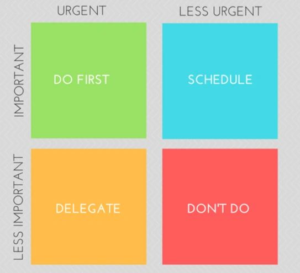
If I were asked which one of the five tips I'm providing is the most important, it would be this one. A task checklist is a visual tool of accountability.  Start the first 10 minutes of your day by writing down all the things you need to accomplish. Ask yourself: which activities generate the most income? Begin prioritizing your most income-producing tasks first using the Eisenhower matrix:

time management

1. Do First

Tasks in the green box should be the core tasks that directly earn you money such as responding to new leads and current clients.

2. Schedule

Important, but not urgent tasks belong in the blue box.  Schedule tasks like continuing education, reading the latest IRS updates and researching virtual assistants.

3. Delegate

The yellow box should be reserved for less important tasks, but need to be done rather quickly. These are tasks that do not necessarily have to be done by you. These tasks can and should be, delegated to someone else. Hiring a Virtual Assistant is a great way to delegate tasks.

4. Don’t do

The red box is for STOP. These are the tasks that aren’t helping you at all. For most people, these will be time-wasters such as spending time on social media related. For example, have you been spending an hour a day on Facebook with nothing to show for it? Probably time for a new strategy. These tasks should definitely be turned over to a Virtual Assistant.

Prioritizing your daily tasks will make you that much more productive and mindful of how you spend your time. By using a Task Checklist daily, you’ll start to recognize patterns in your routine and find solutions to improve your results.

5. Hire a Virtual Assistant


No one person can do it all. Delegate or outsource everything except the stuff you’re good at because it allows you to focus on the tasks that you’re amazing at, like analyzing the numbers!

Virtual AssistantLook back on your daily task checklist; how many of the tasks are not high priority or goal-oriented but need to get done? How many of those tasks can you delegate to your VA - social media accounts, monthly mailings, engagement letters, and administrative tasks?

A virtual assistant is your customizable asset!

5 Tips To Stay Ahead Of The Curve Read More »

vacation tips

Prepare Now for a Stress-Free Return

vacation tips

Prepare Now for a Stress-Free Return

task virtual assistant

Modified from original post, published December 19, 2019

Taking some time off during the Holidays? Looking forward to enjoying some festivities, but dread the mountain of work you know will be waiting when you return? Make a few preparations now before you leave, and follow some tips when you return, to help ease you back into a routine and maybe even stretch your relaxed and festive mood well into the first week or two of the new year!

Taking care of a few things now before you leave, will have you thanking yourself when you come back!!

Notifications: Set up your Out-Of-Office and Voicemail messages now. These are probably the two most overlooked yet simplest tasks to quickly take care of. Many email programs such as Outlook and Gmail will let you schedule the OOO in advance. If your phone system doesn’t allow for advance messaging, write the message out, and have it ready to record quickly. Don’t stress yourself by waiting until 5 minutes before you’re trying to get out the door!

Schedule Meetings: That New Year staff meeting can wait until Tuesday afternoon – 2:30 PM to be exact – after you return. A study by YouCanBookMe shows this to be the very best time to schedule a meeting. Also, don’t forget to schedule a reminder, preferably with a scheduled email, in addition to the popup reminder notification.

While you’re adding meetings to your calendar, I want you to schedule 3 lunches your first week back. As you ease your way back into the routine, time away becomes paramount. Schedule alternate days (I recommend this!) or consecutively, but do it in “ink” and do not allow yourself to cancel.

This becomes all too important, especially with our new work-from-home routines. It can become easy to forget about ourselves because, in our minds, we are already at home and feel guilty if we take any "me" time.

Whether you are returning to the office or multiple zoom meetings, you need to add a 30-minute “catch up” time to your schedule. The purpose is to socialize and catch up with your office pals. Scheduling this time will help avoid unnecessary interruptions.

4377055

Task List: You know I’m all about these lists! Make a complete list of all the projects you are working on, including the ones you’ve been putting on the back burner. Take a few minutes to prioritize everything – use the Eisenhower Matrix found in my 5 Essentials Tips blog to help organize these projects. Your “vacation brain” will thank you when it’s time to jump back into things!

Clean Up Your Desk: Put all tasks away and take the last 20 minutes before you leave to clean up your desk. Put away the files you’ve been working on, put books back where they belong, straighten up the supplies. Take one last look at your returning Task list. Make sure you have only the most urgent and important tasks scheduled your first week back.

holiday email return

Tips for Your Return: Returning to the office has been sometimes compared to getting a root canal! Just the volume of emails alone is enough to make even the bravest quiver!!! Three good rules for returning:

  • Try to stay in a selective stealth mode the first few days back, giving those that “need to know” a heads up about your return.
  • Break the first few days into little chunks. For example, take care of emails and phone calls on the first day, and review reports on day two.
  • Do Not Stay Late! As tempting as it might be, slowly easing back into that full “work late” schedule will help you be more focused and productive.

These are just a few things you can do to help relieve the stress of returning to work after an extended Holiday, with an emphasis on getting out of the office or away from your desk - have lunch with a friend, take a walk – get away for at least 30 minutes.

I’d like to close with one final list, it’s my "To-Don't List":

  • Don’t schedule multiple meetings your first day/week back
  • Don’t set unrealistic deadlines for your first day back
  • Don’t try to do everything the first day back

This will only leave you overwhelmed, underproductive, and put you behind in your work.

Prepare Now for a Stress-Free Return Read More »

Negative Social Media Comments: How to Deal

negative-comments-social-media

Social Media Is A Relationship Building Tool

Add-a-subheading

As you become more popular you’re going to get more people who love you, but also more people who hate you. Some people don’t even hate you, they just like to be trolls. It’s important to know how to deal with these types of people so that you can use social media marketing to build traffic, make more connections, and increase your return on investment.

Develop a Policy

If you have many people helping you manage social media, you need to develop a policy. There is a difference between a troll and someone who has something negative to say. Therefore, you want to treat them differently. A troll should be blocked, and their comments deleted. Someone who is negative might just need some extra attention to turn them around.

Ignore Real Trolls

When someone is a real troll they have nothing useful to say at all and are intent on disrupting a discussion or even an entire business. These types of people may even be paid. You have no way of knowing. The best course of action is to ignore them, delete, and block them. There is an exception to this rule. If the issue becomes widely known due to not deleting fast enough you may have to fight back by outing the troll for who they are and let your real audience deal with them.

Make a Joke Out of It

Sometimes trolls and negative people are a little bit funny. It depends on your audience of course, but if you can make a joke out of something that’s a great way to deal with it. For example, if someone asked you what’s taking so long for a shipment to get to them and you know you mailed it the day they ordered it you may need to point out in a humorous way that you have no control over the post office.

Look for The Deeper Message

Sometimes trolls or people who make negative comments are just unhappy people who need something. If you can read between the lines and find a better message answer that message and ignore the nastiness. Killing them with kindness can work very well for riding your feed of trolls.

Hire or Get Volunteer Moderators

When your community grows very large you may need to get help managing your social media to prevent the proliferation of spammers and trolls from taking over your page or community. One of the reasons some big-time coaches have ended their Facebook Groups has to do with poor group management. If it’s getting too big, get some help.

Build Relationships with Your Community

Don’t just talk one way to your community. Don’t just sell them all the time. Have real conversations with members of your community and let them get to know you. When someone is nasty or trolling they’ll report it and probably attack the offender on their own even if you’re sleeping in bed.

Show the Facts

If it’s appropriate baffle the negative person or troll with facts. If you have facts you can prove with real study and research, you’ll find that most of your community will value what you’re saying a lot more than someone who drives by with some negative info.

Dealing with trolls and negative people can be daunting. But, if this starts happening take heart in the fact that it’s mostly because your community is growing, which is a good thing. But don’t take it personally. When it’s possible the very best thing you can do about a troll is not provide a platform for them and delete and block them.

Negative Social Media Comments: How to Deal Read More »

Social Media is a Relationship Building Tool

qtq80-c3tI7Z

Social Media Is A Relationship Building Tool

Add-a-subheading

Social media is an amazing invention that puts word-of-mouth marketing on steroids. It’s like having a coffee shop, community center, and bar all from the comfort of your home where you can talk to a wide variety of people about almost any topic you can think of. That’s why, at its heart, social media is a relationship building tool.

Building relationships online takes a little time and effort but the pay off is huge. Let’s look at some ways you can use social media to build relationships.

Be Authentic

No one likes to find out someone they admired lied. If you’re not running a six-figure business don’t try to tell others how to do it and don’t make people think you are. You will be found out. Instead, just be who you are, because that’s so much easier. You won’t ever have to feel fake or get nervous because you are who you are.

Understand Your Niche

Every single day keep studying your niche and your audience. Killer apps come along every single day and disrupt businesses all across the world. It can happen to you too if you’re not keeping your ear to the ground and paying attention to industry news. Consider how fast technology is changing in relation to your niche so you can stay ahead of the game. Plus, when you show a deep understanding you can better engage intelligently with your audience.

The Customer is Right

Most business owners hate hearing this but even when the customer is wrong, on social media the customer needs to be right. Do not fight with customers on social media. Even if they say hateful things cancel out all that and address only the issue at hand that you can fix for them. They likely told you how they want you to fix it, so now it’s up to you to do that, even if they’re really wrong because the optics of this type of situation on social media can spell the end of any business fast.

Create Brand Ambassadors

One way to make your customers rave about you is to rave about them. Share projects with them that aren’t complete, ask their advice. Use social media to communicate directly with your audience. Make them feel as if they’re part of your company because you listen to them so much that the products and services you create make some of your audience feel as if you’re reading their mind. You can even incentivize some of your customers by making them referral partners if you wish.

Follow Everyone Back

On some social networks, you have a choice of following people back who follow you or not. But, you should follow them back. The more people you have in your social networks the better. You never know who they’re connected to that might see something they “like” or share of yours so always when possible reciprocate. One exception is your personal Facebook Profile where you only get 5000 friends.

Building relationships with your audience can take some time. But, once you set up a process for succeeding with social media marketing to build traffic to your website, if you don’t skip the engagement portion of social media marketing you’re going to do fabulously.

Social Media is a Relationship Building Tool Read More »

Evergreen and Immediate Social Media Traffic Tactics

evergreen

Evergreen and Immediate Social Media Traffic Tactics

Add-a-subheading

When using social media to drive traffic it’s important to recognize that some activities provide short-term, quick bursts of traffic while others work for the longer term.

For example, when you post something on Twitter, it runs through the feed and people either see it and click on it, or they don’t. When you put something on Pinterest it’s searchable for as long as it’s on Pinterest and will send traffic for the long-term.

Ensure that you have a good mix of evergreen content and trending content with the focus primarily on evergreen content. This tactic allows you to use social media marketing successfully to drive traffic all the time, not just when you share something in the moment.

  • Read Industry News – This is a great way to find things to share on Twitter, but also provide good fodder for original content that you can create for other platforms like Pinterest or a blog post for your blog.
  • Provide Quality over Quantity – Whether it’s evergreen content or trending content ensure that anything you create, or share is high quality, accurate, and relevant to your audience. In the quest to find content to drive traffic it can be tempting to skip that step but if there is no reason that is relevant to your audience to share the content, don’t do it.
  • Mix it Up – Do both Evergreen content and trending content. Set up your Social Media Planner according to your promotions you already know about, industry events you already know about, and then keep up to date on the news so that you can add in trending information. Share all of it across all of your social media platforms.
  • Change up The Format –Don’t focus your content on only text content. Use different formats to present the same content. For example, if you read a trending article that really made you think, make a video about it to introduce it and then link to it.
  • Add in Seasonal Content – One type of trending content that you should consider adding if it’s appropriate for your niche is seasonal content. Let’s say your industry group is having a Christmas party, that’s something to talk about and to blog that will get a lot of attention.
  • Share Everything – Whether it’s evergreen content or not, focus on sharing it in its various forms on every social media platform that you use. That way you get both short bursts of traffic plus set yourself up for having traffic build slowly over the long-term.
  • Focus More on Evergreen Content – The most important content you can create for your business is evergreen content. That is content that will be useful to your clients for a long period of time. With today’s advancing technology it may not be good forever, but evergreen content should be good at least a year.

Evergreen content, for the most part, will start on your blog. It doesn’t matter if it’s text content or content in another form, but it's on your blog too. Trending content sometimes will go on your blog first, but often it’s a matter of sharing it because someone else talked about it. But sharing it is important too, because it shows that you’re paying attention to your industry.

Evergreen and Immediate Social Media Traffic Tactics Read More »

Plan Ahead to Take the Stress Out of Tax Day

qtq80-0xqnwT

Plan Ahead to Take the Stress Out of Tax Day

Add-a-subheading

April 15 is a dreadful day for many people, simply because it's the deadline for filing income taxes. The truth is this day doesn't have to be ominous or overwhelming. You can reduce your stress and improve your financial future simply by getting a jump on your income tax preparation early.

Gather your records early. Take the time to gather all of your documentation together beforehand so you have everything you need to get started. Gather your past tax returns as well, as these will provide valuable insight for where you can save money on your taxes in comparison to previous years.

Look to government resources for help. The Internal Revenue Service website and taxing authority websites for each individual state are valuable resources for individuals seeking tax help. Use these free resources to your advantage to get some extra assistance while filing your taxes.

Make last minute tax-deductible purchases. Especially if it looks like you'll owe money on your return, before the end of December, make any purchases that can give you an extra tax deduction. If you're self-employed, purchase necessary items for your business.

Donate cash or items. Remember to make your donations before December 31st so you'll receive your tax deduction for this year. Be sure to get a receipt!

E-File your return. There are a number of benefits to e-filing, or electronically filing, your tax return. For example, most E-file software will compute tax credits and deductions for you based on the information that you put in. Plus, if you're getting a refund, it's quicker than mailing your return.

The Bottom Line

The best way to get the most out of your income taxes is simply to get a jump on them early. With planning and preparation, you can maximize your deductions and simplify the filing process without stressing yourself out along the way.

Plan Ahead to Take the Stress Out of Tax Day Read More »