Prepare Now for a Stress-Free Return
Prepare Now for a Stress-Free Return

Modified from original post, published December 19, 2019
Taking some time off during the Holidays? Looking forward to enjoying some festivities, but dread the mountain of work you know will be waiting when you return? Make a few preparations now before you leave, and follow some tips when you return, to help ease you back into a routine and maybe even stretch your relaxed and festive mood well into the first week or two of the new year!
Taking care of a few things now before you leave, will have you thanking yourself when you come back!!
Notifications: Set up your Out-Of-Office and Voicemail messages now. These are probably the two most overlooked yet simplest tasks to quickly take care of. Many email programs such as Outlook and Gmail will let you schedule the OOO in advance. If your phone system doesn’t allow for advance messaging, write the message out, and have it ready to record quickly. Don’t stress yourself by waiting until 5 minutes before you’re trying to get out the door!
Schedule Meetings: That New Year staff meeting can wait until Tuesday afternoon – 2:30 PM to be exact – after you return. A study by YouCanBookMe shows this to be the very best time to schedule a meeting. Also, don’t forget to schedule a reminder, preferably with a scheduled email, in addition to the popup reminder notification.
While you’re adding meetings to your calendar, I want you to schedule 3 lunches your first week back. As you ease your way back into the routine, time away becomes paramount. Schedule alternate days (I recommend this!) or consecutively, but do it in “ink” and do not allow yourself to cancel.
This becomes all too important, especially with our new work-from-home routines. It can become easy to forget about ourselves because, in our minds, we are already at home and feel guilty if we take any "me" time.
Whether you are returning to the office or multiple zoom meetings, you need to add a 30-minute “catch up” time to your schedule. The purpose is to socialize and catch up with your office pals. Scheduling this time will help avoid unnecessary interruptions.

Task List: You know I’m all about these lists! Make a complete list of all the projects you are working on, including the ones you’ve been putting on the back burner. Take a few minutes to prioritize everything – use the Eisenhower Matrix found in my 5 Essentials Tips blog to help organize these projects. Your “vacation brain” will thank you when it’s time to jump back into things!
Clean Up Your Desk: Put all tasks away and take the last 20 minutes before you leave to clean up your desk. Put away the files you’ve been working on, put books back where they belong, straighten up the supplies. Take one last look at your returning Task list. Make sure you have only the most urgent and important tasks scheduled your first week back.
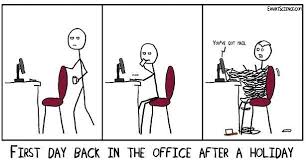
Tips for Your Return: Returning to the office has been sometimes compared to getting a root canal! Just the volume of emails alone is enough to make even the bravest quiver!!! Three good rules for returning:
- Try to stay in a selective stealth mode the first few days back, giving those that “need to know” a heads up about your return.
- Break the first few days into little chunks. For example, take care of emails and phone calls on the first day, and review reports on day two.
- Do Not Stay Late! As tempting as it might be, slowly easing back into that full “work late” schedule will help you be more focused and productive.
These are just a few things you can do to help relieve the stress of returning to work after an extended Holiday, with an emphasis on getting out of the office or away from your desk - have lunch with a friend, take a walk – get away for at least 30 minutes.
I’d like to close with one final list, it’s my "To-Don't List":
- Don’t schedule multiple meetings your first day/week back
- Don’t set unrealistic deadlines for your first day back
- Don’t try to do everything the first day back
This will only leave you overwhelmed, underproductive, and put you behind in your work.
Prepare Now for a Stress-Free Return Read More »











 When you think of a successful CEO, do you wonder how they make it look so easy? How did they get where they are? It almost seems a fantasy that someone can run a company, spend time with family, exercise every day, yet still manage to enjoy their hobbies as well, such as writing a book, or building a boat. You know the kind of person we’re talking about because there are loads of these successful people out there. Do you want to know how they do it? What is their secret formula?
 Steve Jobs wore the same outfit every day so that he didn’t have to mull over a bunch of wardrobe options every morning. Barack Obama limits his outfits to gray or blue suits. Nick Taranto used to only wear shoes without laces, so he didn’t have to tie them. Keep a diary of all your repetitive daily tasks; which ones require a decision or take a little time? Can you narrow the choices down, or eliminate altogether? You may think that trivial decisions only take seconds away from your time, but those are seconds you’ll never get back.
 They are almost always a waste of time. Most things can be handled via email today, but if you really need to schedule a meeting, have a streamlined agenda and a time limit for the meeting – and stick to it! Otherwise, migrate your meetings to an email chain or work chat platform like
  This sounds like a no-brainer, but you’d be surprised at how much time is wasted unnecessarily. If you’re waiting in line, check off some of your task items, or when you’re driving, listen to a podcast or audiobook that will teach you something new to implement into your life. To put it simply, train your brain to always be productive.